
How to Embed a Live Ham Radio Activity Widget on Your Club Website
Show real-time member spots, POTA activations, and on-air activity — free, no coding required. Five steps, under ten minutes.
Show real-time member spots, POTA activations, and on-air activity — free, no coding required. Five steps, under ten minutes.
Most amateur radio club websites look the same: meeting times, a repeater frequency, maybe a photo gallery from Field Day. What they rarely show is the one thing that would make a visitor want to come back, live proof that people in the club are actually on the air right now.
A live ham radio activity widget changes that. Paste one line of HTML into your club website and you get a continuously updated feed of real spots: who is on the air, what frequency, what mode, and when. Visitors see a living, breathing club instead of a static page. Members have a reason to check the site between meetings. Prospective members get immediate evidence that the club is active.
SpottedHam's embeddable widget is free, requires no API key or backend setup, filtering to show only your club members' activity. Here is how to add it in under ten minutes.
A static club website serves information. A live activity feed serves community. The difference is engagement — visitors who see real-time activity on a page spend more time on it, return more often, and are more likely to join.
For club officers and webmasters, the other benefit is less obvious but equally real: a live feed does the work of a weekly newsletter for one specific question that members ask constantly — "Is anyone on the air right now?" Instead of a net night reminder email that goes unread, the answer is always visible on the front page of your website.
There is also an SEO dimension. Search engines reward pages that are updated frequently. A live spot feed updates every few minutes automatically, signaling fresh, relevant content without any manual work from the webmaster. Over time, a club page with an embedded activity widget will tend to rank higher for searches like "[your club callsign] ham radio" or "[your city] amateur radio club" than an equivalent static page.
Beyond pure search rankings, the widget gives your club a natural presence in conversations that happen outside your website. When a member self-spots a POTA activation or a club net check-in generates a cluster spot, that activity is now visible on your site in real time — a signal to anyone searching that your club is active, accessible, and worth contacting.
The SpottedHam widget displays a live scrolling feed of amateur radio spots drawn from DX clusters, POTA, SOTA, and Spotted Ham itself. Each entry shows the spotted callsign, frequency, band, mode, the time of the spot, and any notes posted by the spotter.
The feed updates automatically, new spots appear at the top without a page refresh (every two minutes), so visitors who leave the tab open will see activity accumulate in near real time. The widget is responsive and works on mobile screens as well as desktop displays, which matters when members are checking activity from their phones between operating sessions.
On your site, users can additionaly filter it with the search feature. Showing only club member spots keeps the feed focused on your membership and avoids noise from the full DX cluster stream. Filtering by a specific band — 40 meters for a club that runs a regular ragchew net, for example, or 2 meters for a repeater-based club — creates a feed relevant to the operating culture your club actually has. You can also leave the feed unfiltered to show broad activity across all bands and modes, which works well for clubs with a diverse membership.
One feature that sets SpottedHam apart from generic DX cluster widgets is sticky self-spotting. When a member self-spots via SpottedHam, their spot is pinned to the top of the club widget for one hour. That means
The first step is creating an acccount on SpottedHam. You will need your club callsign, your club's name, and a brief description. Registration is free and takes about two minutes. Alternatively, register with your own callsign. Once the club widget is set, you may add additional account managers for the widget.
Go to Top POTA Activators to see a live preview of the widget. The demo shows a working feed so you can see exactly what your members and visitors will experience before committing to anything.
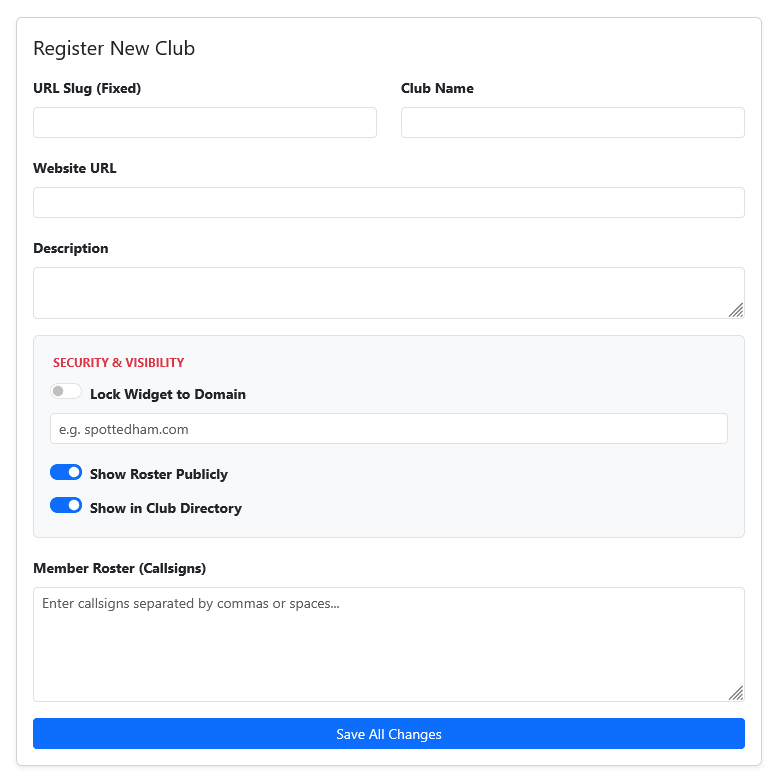
Visit the SpottedHam clubs manager and add your club. Select what the widget should display. Options include all recent spots, club member activity only, a specific band and mode, or POTA spots for parks your club regularly activates. The preview updates as you adjust filters, so you can see the result before generating the embed code.
Example embed code. The code is a small snippet, no API keys, no external scripts to maintain.
                        <div id="spottedham-widget"></div>

                        <script src="https://www.spottedham.com/clubs/widget.js" data-club="toppota>"></script>
Open your website editor and paste the code where you want the widget to appear. Save and publish. The widget starts pulling live spots immediately — no further configuration required.
The most effective placement depends on how your members use your site and what you want visitors to see first. A few configurations that work well for club websites:
Homepage sidebar. A narrow version of the feed in the sidebar of your homepage answers "is anyone on the air right now?" immediately, without requiring any navigation. Visitors who arrive from a search see live activity before they read a single word of static content. This is the highest-impact placement for recruitment — it makes the club look active at a glance.
Dedicated "On the Air" page. Some clubs prefer to keep the homepage clean and instead link to a full-width activity page — something like yourclub.org/on-the-air. This works well for clubs that use the page as a reference during nets and activations. Members can open it on a phone or tablet and watch activity update in real time without navigating elsewhere.
Net night page. If your club publishes a net schedule, embedding the widget on that page gives operators a live view of whether the net frequency is already in use and whether early check-ins are appearing on the bands. It turns a static schedule into an interactive tool.
The widgets's width and height attributes are easy to adjust. A 100% width and 300-pixel height fits cleanly in most sidebar layouts. Full-page placements work well at 100% width and 600 pixels or more. The widget's internal layout is responsive and reflows correctly at any size.
The embed code is a standard HTML and JavaScript, which means it usually works pretty much any webserver. Hosting the code on sites like QRZ or Groups may have limitations due to there own security settings.
WordPress or similar CMS setups — in the block editor, add a Custom HTML block and paste the code. In the classic editor, switch to the Text tab and paste at the cursor. Works with any theme and does not require a plugin.
Hand-coded sites — paste the code directly into the HTML. No additional dependencies required.
If your club's website platform requires a full URL rather than raw HTML — some older club site builders work this way — visit the widget demo page for a direct link option that opens the SpottedHam feed in a new browser tab instead of embedding inline.
The widget handles the visual layer — it shows members what is happening on the bands right now. Email alerts handle the notification layer — they reach members who are not actively watching the page.
SpottedHam's email alerts are particularly well-suited for clubs because if your members subscribe for alerts for your club callsign, you now have a method to alert them all once activating. Example, club callsign being used on Field Day or POTA event.
Club station monitoring. Your club has a station that goes on the air for contest weekends, special events, and public service activations. Right now, finding out the station is on requires checking the bands yourself or seeing a post on a mailing list. With the widget on your website, any visitor — member or prospective member — can see club station activity in real time. During a Field Day or a 13 Colonies special event, the page becomes a live broadcast of club activity that members can share on social media or with friends who are curious about ham radio.
POTA club activations. Many clubs have a defined list of local parks they activate regularly. A widget filtered to show POTA spots for those parks or for activating club members gives hunters an easy way to find the activation in progress and gives the club website a reason to exist during the activation itself. Pair this with a sticky self-spot from the activator and the club call appears at the top of the feed from the moment the activation begins.
Net night check-ins. Weekly club nets generate a burst of spot activity — members checking in, club net control spotted by RBN, the frequency busy for the duration. A widget on the net night page makes check-in activity visible to the whole club and gives members who cannot check in by radio a way to follow along and see who is participating.
Register your club on SpottedHam, visit the widget demo page to configure your filters and generate the embed code, then paste a small snippet of code into your club website. No coding knowledge is required and the whole process takes under ten minutes.
Yes. The widget is completely free to embed on any club website. There is no paid tier, no credit card required, and no ads served inside the widget.
Yes. The embed code works in any website builder that accepts custom HTML, including WordPress, Wix, Squarespace, Weebly, and hand-coded sites. In WordPress, use a Custom HTML block. In Wix, use the Embed HTML element.
Yes. Once your club is registered on SpottedHam and members have linked their callsigns to the club, the widget can be configured to show only spots from those members. This is one of SpottedHam's unique features — no other ham radio spotting service filters by club membership.
No. Spots are pulled from public networks, so any member spotted on a DX cluster, POTA, SOTA, or SpottedHam will appear automatically. Members who create a free SpottedHam account and join the club get additional features, including sticky self-spots that stay pinned to the top of the feed for one hour.
Create a SpottedHam alert and set the delivery address to your club's email distribution list or reflector. When a matching spot appears, SpottedHam emails the list — every subscriber receives the notification without any individual configuration.
See the widget in action and get your embed code in under ten minutes — free, no account required to try it.
See the Widget Demo Find Your Club on SpottedHam13 clubs are already using SpottedHam widgets on their websites.
Join them →